
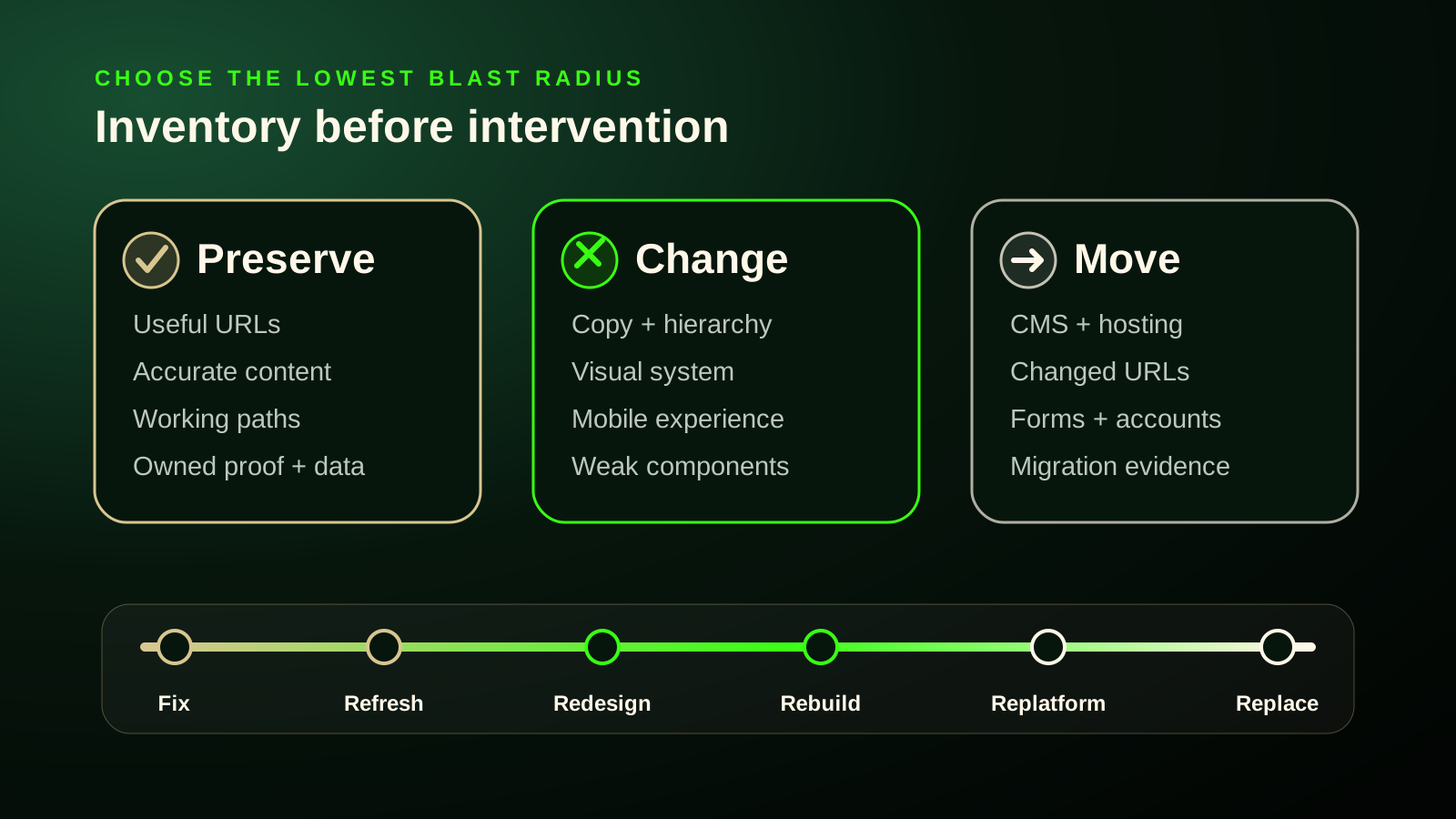
A website can look old without being structurally broken. It can also look modern while hiding a bad service structure, fragile code, missing ownership, broken forms, or a platform the business can no longer operate.
That is why “redesign or new website?” is the wrong first question.
The real job is to identify which layer has failed, choose the smallest intervention that removes the constraint, and then separately account for anything that must move.
Quick answer Scope comes from what must change. Blast radius comes from what must move. Diagnose the deepest failed layer—visual, content, information architecture, implementation, platform, or full business model—then choose among fix, refresh, redesign/restructure, rebuild, replatform, or replacement. Treat URL, domain, hosting, data, tracking, and integration migration as a separate risk map.
Current as of: Google Search migration guidance, W3C accessibility material, web.dev performance guidance, and primary platform documentation were checked August 27, 2026. Recheck technical platform and migration procedures before a live project.
Stop using project labels as diagnoses
“Redesign,” “rebuild,” and “new website” are sales words. The industry does not use them consistently enough to define scope.
One provider may use redesign to mean updated colours and layouts on the existing CMS. Another may use the same word for new information architecture, rewritten content, a new frontend, a platform migration, and changed URLs.
A buyer cannot safely infer the work from the label.
Use operational definitions instead.
| Intervention | Buyer-useful definition | Usually preserved | Usually changes |
|---|---|---|---|
| Keep + fix | Correct bounded defects without materially changing architecture or platform | most pages, URLs, CMS, templates | individual forms, links, CTAs, content, metadata, components |
| Refresh | Modernize visual presentation or stale content while retaining basic structure and capabilities | platform, primary routes, content model, main flows | typography, palette, spacing, imagery, selected copy/components |
| Redesign / restructure | Change how the site is organized and understood by customers | platform may remain; URLs may remain | information architecture, navigation, service hierarchy, templates, content presentation, CTA flow |
| Rebuild | Reimplement the technical presentation/application layer because the current implementation is the constraint | domain, URLs, content, and even CMS can remain | theme, templates, components, frontend/runtime architecture |
| Replatform | Move to another CMS, builder, commerce platform, or application stack because the current platform is the constraint | brand, design, content, and URLs may be preserved | editing model, data structures, integrations, deployment, platform |
| Replace / new website | Replace several foundational layers because little of the current system remains fit for purpose | valuable facts, proof, content, assets, and routes where justified | potentially strategy, IA, content model, design, implementation, platform |
| Migration | Transfer work caused by something moving from one system/address to another | not an intervention depth by itself | URLs, domain, hosting, CMS, data, tracking, integrations, or combinations |
The key correction is this:
Migration is a modifier, not the final rung on a redesign ladder.
A site can receive a major same-platform redesign with no URL migration. A business can also replatform while preserving nearly the same visual design. Those are different workstreams.
Diagnose the deepest failed layer
A website is several systems stacked together:
- business positioning and offer;
- content and service information;
- information architecture and navigation;
- visual design and content hierarchy;
- conversion paths and interaction design;
- components, templates, and frontend implementation;
- CMS, platform, hosting, and editing workflow;
- forms, bookings, payments, analytics, and integrations;
- URLs, search history, backlinks, and indexed content.
The size of the visible symptom does not tell you the required scope. The root layer does.
| Symptom | First layer to investigate | Lowest reasonable intervention | Escalate when… |
|---|---|---|---|
| fonts, colours, imagery, and spacing feel dated | visual design | refresh | templates prevent a coherent visual system |
| services changed but navigation still works | content | content update | new services make the whole taxonomy misleading |
| visitors cannot tell which service applies | content + information architecture | restructure/redesign | platform cannot represent the required relationships |
| one form has too many fields | local interaction defect | repair the form | all lead paths depend on an inflexible broken form system |
| mobile breaks across most templates | shared implementation | rebuild components/templates | platform itself prevents required behaviour |
| site is slow because of one oversized hero | asset/loading defect | optimize asset and loading | shared runtime architecture is the cause |
| routine updates require dangerous hacks | implementation/maintenance | rebuild | platform/update model remains the constraint |
| business needs accounts, quoting workflows, or ecommerce | capability/platform | platform assessment | current platform cannot support it maintainably |
| URL structure and content model no longer fit the business | IA + content model | redesign/replatform assessment | useful routes must change and migration becomes unavoidable |
The useful rule is:
A symptom does not determine scope; its root cause does.
A slow homepage might need one image fixed. A slow application might be constrained by server response, excessive shared JavaScript, rendering architecture, or a plugin/theme system that cannot be improved safely.
A weak conversion rate might come from one form, a vague offer, irrelevant traffic, broken tracking, or business follow-up. None of those automatically means “replace the website.”
Use the Preserve / Change / Move inventory
This is the cleanest way to stop a redesign proposal from becoming a demolition mood board.
Preserve
Keep assets that already carry value:
- useful URLs with search traffic, links, referrals, or campaign history;
- accurate service pages and buyer questions;
- real project photos, reviews, case examples, and recognizable branding;
- working forms, bookings, and contact paths;
- analytics properties, Search Console access, conversion actions, and reporting history;
- content structures and platform features that remain maintainable;
- domains, email, and accounts the business already controls.
Change
Improve assets that still belong in the future system:
- unclear service wording;
- weak first-screen hierarchy;
- stale visual identity;
- confusing navigation;
- missing proof;
- poor mobile composition;
- inaccessible controls;
- brittle components;
- content architecture that no longer matches the business.
Move
Migrate assets or systems whose current location is the constraint:
- content trapped in an unsupported or inaccessible CMS;
- hosting or deployment infrastructure;
- domains or URL paths;
- products, customer records, bookings, or structured data;
- forms, CRM, payment, email, and automation integrations;
- tags, consent tooling, call tracking, and conversion measurement.
The distinction produces much sharper scopes.
Preserve: domain, thirty-five valuable URLs, reviews, GA4 property Change: service hierarchy, navigation, mobile templates, CTA flow Move: nothing Likely scope: redesign/restructure on the current platform
versus:
Preserve: branding, useful content, product descriptions, URLs where possible Change: editing workflow and platform constraints Move: CMS, product data, checkout configuration, integrations, pixels Likely scope: replatform with migration—not primarily a visual redesign
Scope is mostly determined by CHANGE. Blast radius is mostly determined by MOVE.
The six intervention depths
Keep + fix
Choose repair when problems are bounded, understood, testable, and cleanly correctable inside the current system.
Typical examples:
- broken contact links;
- form routing or validation errors;
- outdated service wording;
- missing metadata;
- weak internal links;
- one inaccessible component;
- one slow image or script;
- incorrect phone, hours, location, or booking information.
Age is not enough to escalate the work.
Refresh
Choose a refresh when the structure, ownership, platform, and core customer paths still work, but presentation or content freshness is the main complaint.
Typical work:
- visual-system cleanup;
- better typography and spacing;
- new imagery;
- stronger proof presentation;
- clearer homepage hierarchy;
- selected copy updates;
- component polish without architectural change.
A refresh is not a dishonest “mini redesign.” It is the correct job when the system already fits.
Redesign / restructure
Choose redesign when the customer-facing organization no longer works.
Signals include:
- service structure does not match how customers decide;
- navigation is confusing across the site;
- key pages mix unrelated intent;
- the homepage cannot route buyers clearly;
- mobile hierarchy fails consistently;
- templates do not support the necessary proof and decision information;
- conversion paths are structurally buried.
The CMS can remain. URLs can remain. A redesign does not technically require a platform move or URL changes.
Rebuild
Choose a rebuild when the correct customer experience is understood but the current implementation cannot support it cleanly.
Signals include:
- shared templates repeatedly create defects;
- changes require duplicated hacks;
- components are inaccessible or unstable across the site;
- runtime or theme architecture creates recurring performance problems;
- upgrades cause cascading breakage;
- another qualified developer cannot maintain the system without tribal knowledge;
- the frontend needs reimplementation even though the content/platform may remain suitable.
A WordPress site can be rebuilt on WordPress. A custom frontend can be rebuilt while preserving its CMS. “Rebuild” does not automatically mean “new platform.”
Replatform
Choose replatforming when the platform—not merely the current design—is the material constraint.
Evidence can include:
- required content relationships cannot be represented cleanly;
- routine business updates require developer workarounds;
- required integrations have no viable path;
- ecommerce, booking, permissions, or workflows no longer fit;
- core software cannot be maintained through a supported update path;
- business data is effectively trapped;
- access and ownership make the system impossible to operate safely;
- the platform cannot support a required new capability without becoming a pile of hacks.
Do not replatform because a competitor uses a newer stack. Do it because a required business outcome is materially blocked.
Replace / new website
Replacement becomes defensible when several foundational layers fail together or there is little useful structural/technical value left.
Examples:
- the business model changed completely;
- current content is mostly inaccurate or unusable;
- IA, templates, implementation, and platform all require replacement;
- ownership and maintainability are unacceptable;
- the existing site has almost no meaningful search, content, proof, or operational value to preserve;
- a new application capability changes the nature of the product.
Even then, “replace” does not mean discard everything. Useful URLs, photos, reviews, analytics history, customer language, and business facts still require deliberate preservation decisions.
Website age is weak evidence
The search landscape still repeats rules such as “redesign every two to three years” or “replace every three to four years.” The primary sources reviewed do not establish a universal expiration date.
A site does not become unfit because its birthday arrived.
Stronger evidence includes:
- customers cannot complete important tasks;
- services or audiences changed;
- the content architecture no longer represents the business;
- the system cannot be updated safely;
- accessibility or performance defects are systemic;
- the platform blocks required capabilities;
- ownership, portability, or maintenance is unacceptable;
- valuable measurement and search continuity are at risk.
A seven-year-old site can be effective and maintainable. A six-month-old site can need major restructuring because it was built around the wrong problem.
SEO problems do not automatically require a new site
Many search problems can be fixed within the existing system:
- weak titles or descriptions;
- missing service pages;
- thin content;
- weak internal linking;
- duplicate URLs with clear equivalents;
- incorrect canonical or index directives;
- stale local/service information;
- unclear page hierarchy.
The escalation test is:
Can the current system create crawlable, useful, distinct pages with intentional URLs, titles, internal links, canonicals, navigation, and content?
If yes, the SEO problem may remain a content or technical-repair job.
If the CMS cannot represent the required content model, the navigation cannot be fixed without replacing shared architecture, or valuable routes must change because the entire taxonomy is being replaced, the scope becomes larger.
Google’s SEO guidance does not say that a newer CMS or replatform improves rankings by itself. Search visibility depends on useful content, crawlability, organization, links, intent, technical output, and many site-specific conditions.
Accessibility problems can be repaired—or expose systemic debt
Accessibility defects also require root-cause diagnosis.
| Condition | Likely intervention |
|---|---|
| a few contrast failures | fix |
| missing labels or alternative text in bounded content | fix |
| one form has keyboard/focus defects | repair component |
| the same inaccessible component pattern appears everywhere | rebuild shared component/theme |
| current framework cannot support required semantics and interaction cleanly | rebuild |
| platform prevents meaningful remediation or control | replatform candidate |
W3C provides guidance for improving existing sites and for integrating accessibility during redesign. It does not support “accessibility scanner score is low, therefore rebuild.” Automated tools cannot determine full conformance by themselves.
The decision is whether the problems are local and repairable or foundational and repeated.
Slow performance is a diagnosis trigger—not a replacement rule
Core Web Vitals and performance tools can show that an experience is slow, unresponsive, or unstable. They do not tell you the project class by themselves.
Common causes include:
- oversized or poorly prioritized images;
- excessive third-party scripts;
- long JavaScript tasks;
- render-blocking CSS or fonts;
- unstable layout dimensions;
- poor server response;
- shared runtime architecture.
The intervention depends on the cause.
Bad performance justifies investigation. Architecture justifies rebuild only when architecture is actually the cause.
Fixing a hero image is not a rebuild. Replacing a frontend that ships excessive shared JavaScript and cannot be decomposed may be.
Platform names are not diagnoses
“WordPress is the problem,” “Wix is the problem,” “Squarespace is too limited,” and “custom is always better” are usually lazy shortcuts.
The useful questions are operational.
| Question | Healthy signal | Constraint signal |
|---|---|---|
| Can the owner/team access and change the system? | documented admin/source/deployment path | former vendor is the only operator |
| Can software be maintained? | supported upgrade path | updates repeatedly break the site |
| Can new content types/routes be added cleanly? | yes | every change requires bespoke hacks |
| Can required integrations be implemented? | supported API/integration path | platform blocks or severely constrains them |
| Can content and business data be exported? | practical export/API | data is trapped or needs manual reconstruction |
| Can another qualified provider maintain it? | reasonably | undocumented vendor-specific knowledge is required |
| Can the platform support required workflows? | yes | business process is being distorted around tool limits |
WordPress has maintenance and export mechanisms. Wix supports site/domain transfers. Squarespace exports some content but not every structure or feature one-to-one. Shopify migrations involve products, payments, shipping, customers, pixels, testing, and operational configuration—not just page design.
The answer is not “which platform is coolest?”
It is:
Can the current platform support the required business, content, integration, maintenance, and ownership model without unreasonable fragility?
Use the patchability test for technical debt
There is no defensible universal threshold such as “more than twelve plugins means rebuild” or “a Lighthouse score below 50 means replacement.”
Use patchability instead.
| Question | Repair-friendly signal | Rebuild signal |
|---|---|---|
| Is the root cause understood? | yes | recurring failures nobody can explain |
| Is the defect localized? | one page/component | repeated across templates/system |
| Can it be fixed once? | yes | same hack must be repeated |
| Can it be tested? | clear expected behaviour | side effects are unpredictable |
| Can it survive upgrades? | yes | update immediately breaks it |
| Can another developer maintain it? | yes | undocumented tribal knowledge required |
| Can accessibility/performance work fit cleanly? | yes | foundational patterns prevent it |
Repair when the system remains patchable. Rebuild when the implementation itself has become the recurring constraint.
Business change does not automatically mean platform change
A changed business means the site must be reassessed. The required layer depends on the change.
| Business change | First scope to assess |
|---|---|
| rebrand, same services | refresh/redesign |
| one new service | content/page expansion |
| several new services | IA/service-structure redesign |
| new geography | local content/route structure |
| different audience and buyer path | content + IA + conversion redesign |
| acquisition or domain consolidation | migration/consolidation analysis |
| new booking process | integration + conversion flow |
| ecommerce | capability/platform assessment |
| accounts or client portal | application capability assessment |
| new business model | content model + UX + platform assessment |
The decisive question is:
Which website layer must change to represent and operate the new business?
Migration exposure is a separate axis
Intervention depth describes how much the experience changes. Migration exposure describes how much continuity work the project creates.
| Project | Change depth | Migration exposure |
|---|---|---|
| visual refresh, same platform/URLs | low | low |
| major redesign, same URLs/platform | high | low to moderate |
| new frontend, same CMS and URLs | high | moderate QA, low URL risk |
| CMS change with URLs preserved | moderate/high | moderate |
| page consolidation and URL changes | variable | high |
| domain, CMS, URL, data, tracking, and integration move | high | very high |
This matters because a visually small change can carry large migration risk. Consolidating two domains may involve little design work and substantial search, analytics, and operational continuity work.
A large same-URL redesign can radically change the experience while avoiding the highest-risk URL-migration layer.
What URL-changing moves require
Google treats a move with changed user-visible URLs as a distinct migration class. When URLs change, the project should include:
- an inventory of current URLs;
- old-to-new mapping for valuable pages;
- server-side permanent redirects for permanent moves;
- direct redirects rather than unnecessary chains;
- relevant destinations rather than dumping everything onto the homepage;
- updated internal links;
- intentional canonicals;
- a correct sitemap;
- updates to important campaign/external links where practical;
- Search Console and analytics monitoring after launch.
Google warns that significant site moves can produce temporary ranking fluctuations while pages are recrawled and reindexed. That does not mean redesigns inherently kill SEO. It means URL-changing migrations have a real transition state and should not be created for cosmetic reasons.
Do not change URLs merely to make a redesign feel new.
Measurement and integrations increase blast radius
A site can preserve every URL and still break business operations.
Inventory:
- GA4 and the existing property identity;
- Google Ads accounts, conversion actions, and landing URLs;
- Search Console ownership and verification;
- forms and inbox/CRM delivery;
- booking tools and calendars;
- dynamic call tracking;
- ecommerce events and pixels;
- payment, shipping, tax, and order workflows;
- consent tooling;
- email marketing and automation;
- customer/account data.
Copying a script tag is not proof that measurement continuity survived.
After launch, test the complete action:
visitor action → success state → business delivery → analytics event → advertising conversion → downstream workflow
Measurement dependencies can make a visually simple replatform more complex than a major same-platform redesign.
Root Depth × Platform Constraint
Use this matrix to choose the intervention.
| Platform constraint is low | Platform constraint is high | |
|---|---|---|
| Surface/local problem | fix or refresh | fix if cleanly possible; reassess platform only if even basic changes are blocked |
| Structural customer problem | redesign/restructure | redesign plus likely replatform |
| Technical implementation problem | rebuild on existing platform | replatform or replacement likely |
| Required new capability | extend current system | replatform or custom replacement |
Then add migration markers:
- hosting;
- URLs;
- domain;
- CMS/data;
- analytics/tracking;
- integrations;
- ecommerce/booking/payment.
This is more accurate than a linear “fix < refresh < redesign < rebuild < new site” ladder.
What the decision looks like in practice
Old-looking site that still works
The site ranks for useful services, forms and calls work, pages are accurate, and the CMS is maintainable. The problem is dated styling and weak photography.
Likely scope: refresh. Preserve URLs, content structure, measurement, and platform.
Beautiful site with confused services
The design is polished, but several services are combined, navigation reflects the old business, and visitors cannot tell where they fit.
Likely scope: redesign/restructure. The visual layer is not the main problem.
Healthy CMS, broken custom theme
Content editing and ownership are fine, but the theme is brittle, inaccessible, slow, and impossible to update safely.
Likely scope: rebuild the theme/components on the same CMS.
Fine design, trapped proprietary system
The website looks acceptable, but the business cannot export content, another provider cannot maintain it, required integrations are unavailable, and the former vendor controls deployment.
Likely scope: replatform. The visual design may barely change.
Ecommerce platform move
The project affects products, variants, customers, payments, shipping, tax, checkout, pixels, conversion tracking, domain, and URLs.
Likely scope: replatform with a formal migration plan. Calling this “a redesign” hides most of the work.
One slow page
A large hero image causes poor loading on one route.
Likely scope: fix the asset/loading path—not a new site.
Entire frontend is the performance problem
Every route ships excessive JavaScript, interactions stall, shared components create layout shifts, and the architecture cannot be improved incrementally.
Likely scope: frontend rebuild, potentially on the same content platform.
Myths that create bad scope
“Redesign every two or three years”
Unsupported as a universal rule. Diagnose condition, business fit, maintainability, customer tasks, and required capabilities instead.
“Old-looking means rebuild”
False. Visual debt can often be refreshed while preserving healthy structure and technology.
“Switching platforms improves SEO”
False as a guarantee. A platform move can enable better implementation, but it also introduces migration and continuity work. Search systems do not reward CMS novelty by itself.
“Redesigning means URLs must change”
False. Design, components, navigation, and copy can change while routes remain stable.
“A new site fixes poor leads”
Unsupported. Lead problems can originate in traffic, offer, trust, measurement, forms, delivery, or business follow-up.
“More modern technology means better results”
Unsupported. Technology matters when it changes capabilities, maintainability, performance, ownership, or workflows—not because it is newer.
“WordPress/Wix/Squarespace/custom is always the problem”
False. Diagnose the actual implementation, update path, portability, ownership, content model, and required capabilities.
A decision sequence before requesting quotes
- Name the observed failure. Avoid “the site feels old.” Identify the customer, business, technical, or operational symptom.
- Gather evidence. Search data, analytics, forms, call logs, mobile screenshots, account access, update history, and customer questions.
- Identify the deepest failed layer. Visual, content, IA, interaction, implementation, platform, or whole footprint.
- Inventory Preserve / Change / Move. Do not let valuable assets disappear into a redesign estimate.
- Choose the lowest intervention that removes the constraint. Fix, refresh, redesign, rebuild, replatform, or replace.
- Map migration exposure separately. URLs, domain, hosting, data, measurement, and integrations.
- Define verification. What must work after launch, and how will it be proven?
- Only then compare scope and price. Providers should be quoting the same problem.
If the deepest layer remains unclear, that is the point where a website audit can earn its cost.
Useful next step
Create a one-page scope brief with three headings:
Preserve
List valuable URLs, content, proof, accounts, measurement, and workflows.
Change
List the customer, content, visual, and technical problems that must become different.
Move
List every domain, URL, CMS, data type, form, booking, payment, tracking, and integration that may transfer.
Then ask each provider to state:
- the deepest intervention they recommend;
- the evidence supporting it;
- the migration dimensions created;
- what remains untouched;
- how success will be verified.
Once larger work is justified, use the pre-rebuild website checklist to prepare URLs, content, proof, account access, redirects, forms, and launch QA. Use the SEO-ready launch checklist to verify the replacement surface before it goes public.
Source notes
This article was rebuilt from the Synapse Research Notes source pass checked August 27, 2026. The public article uses a decision model rather than reproducing the source report’s platform-by-platform structure.
- Google Search Central: Site moves with URL changes — URL mapping, redirects, internal links, canonicals, sitemaps, monitoring, and transition-risk guidance.
- Google Search Central: Change hosting without URL changes — separate treatment of infrastructure moves where user-visible URLs remain stable.
- Google Search Central: SEO Starter Guide — site organization, internal links, useful content, and cautious search claims.
- W3C WAI: Planning and Managing Web Accessibility and Evaluating Web Accessibility — remediation of existing sites, integration during redesign, and evaluation limits.
- web.dev: Web Vitals, Optimize LCP, Optimize INP, and Optimize CLS — performance metrics and cause-specific repair paths.
- Nielsen Norman Group: Information Architecture vs Navigation, Incremental and Radical Innovation, and Simplify Forms — user-facing layer diagnosis and evidence-led change.
- WordPress: Updating WordPress and Tools Export — maintenance and portability examples.
- Wix: Transfer a Premium Site and Transferring a Wix Domain — ownership and domain-transfer examples.
- Squarespace: Exporting your site and Moving from Squarespace — portability and URL-planning examples.
- Shopify: Migrate to Shopify and Pixels and customer events — ecommerce/data/operational and measurement migration examples.
Google migration procedures, redirect-duration wording, Search Console workflows, Core Web Vitals, platform export capabilities, supported software versions, pixels, and integrations should be rechecked before a material update or live migration.