
Your analytics can show hundreds or thousands of visits while the phone stays quiet, the quote inbox stays empty, and bookings barely move.
That does not automatically mean your website needs a redesign. “Traffic but no leads” is one visible symptom produced by several different failures. The visitors may be wrong for the business. The right visitors may be landing on the wrong page. The page may be clear but the offer may be weak. The form may work on screen but fail before the message reaches you. People may be calling while analytics records nothing. Or the site may be creating inquiries that the business never answers.
The useful job is not to “increase conversions” in the abstract. It is to find the first broken handoff between a visit and a qualified opportunity.
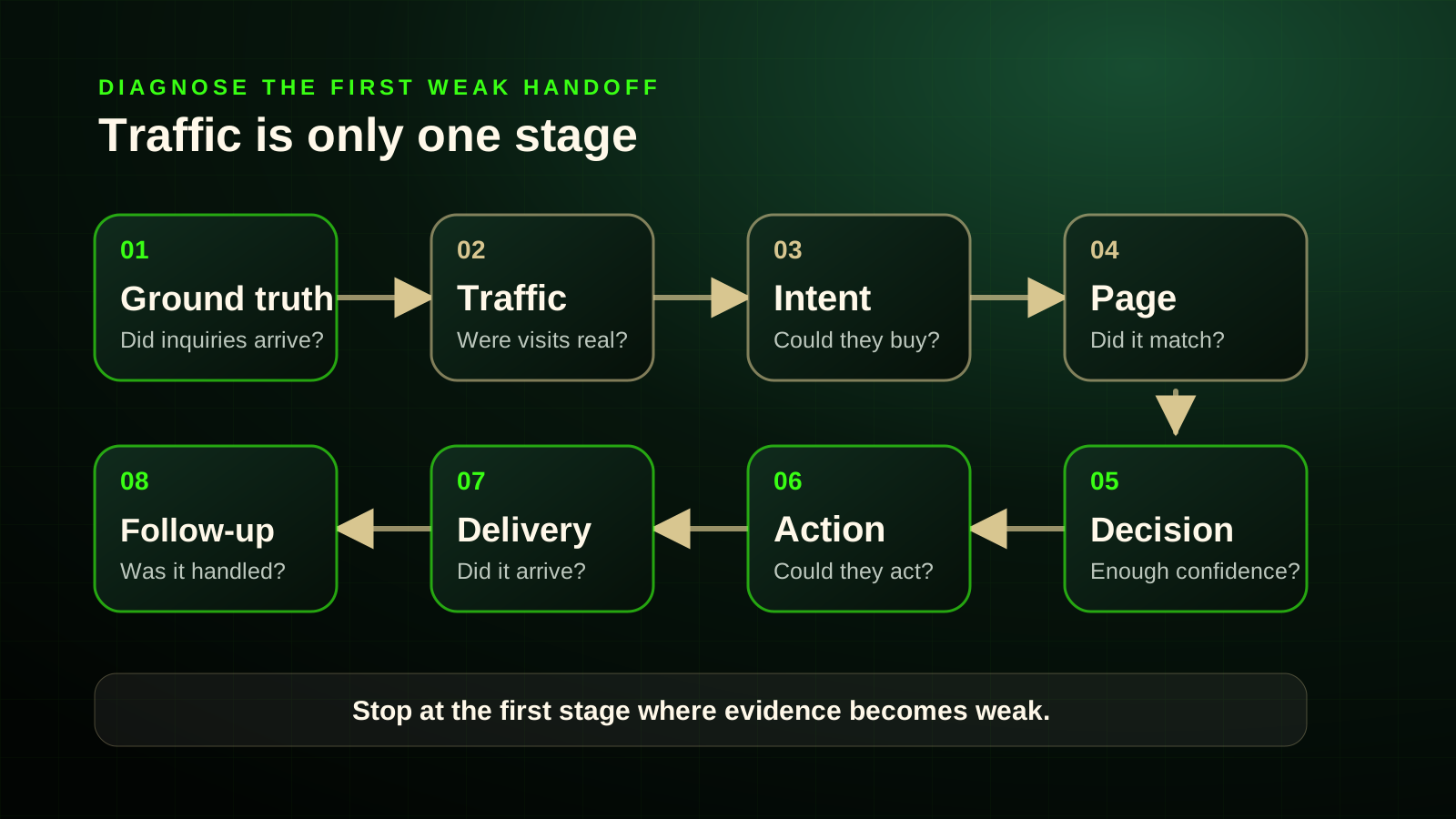
Quick answer Trace one complete path in order: ground truth → traffic → intent → page → decision → action → delivery → follow-up. Stop at the first stage you cannot prove. That is where diagnosis begins. Do not redesign the site, buy more traffic, shorten every form, or blame Google until you know which handoff is actually failing.
Current as of: Research and platform details were checked August 27, 2026. Analytics and advertising interfaces change, so verify current account behaviour before changing measurement.
“Traffic but no leads” can describe three different realities
A top-line dashboard can make these situations look almost identical:
- Leads happened, but your measurement missed or misclassified them.
- Plausible buyers arrived, but something in the website or contact path lost them.
- The site received traffic, but much of it was never commercially useful.
Those situations demand different fixes.
More traffic will not repair a form that sends messages to an abandoned inbox. A prettier homepage will not turn DIY researchers or job seekers into customers. New analytics tags will not make an unclear or weak offer more attractive. And a faster website will not fix calls that nobody answers.
That is why site-wide conversion rate is a weak starting point. It mixes visitors, pages and intentions that should not be judged together. A pricing guide, an emergency-service page, a careers page and a homepage do not have the same job.
The first-broken-handoff diagnostic
Use this sequence from left to right:
| Handoff | Question to prove | Evidence worth checking |
|---|---|---|
| Ground truth | Did real inquiries or bookings happen? | call logs, voicemail, inboxes, booking system, CRM, job records |
| Traffic | Were visits recorded accurately? | GA4 acquisition reports, consent state, tag coverage, suspicious patterns |
| Intent | Could these visitors realistically become customers? | search queries, entry pages, geography, referrals, paid search terms |
| Page | Did the destination match what brought them there? | title/snippet or ad promise, service, location, first screen, mobile view |
| Decision | Did the visitor have enough reason and information to continue? | offer clarity, fit, price orientation, process, proof, objections |
| Action | Could the visitor take a sensible next step? | phone controls, forms, booking links, validation, CTA hierarchy |
| Delivery | Did the inquiry reach the business intact? | recipient inbox, CRM, notifications, spam, integration logs |
| Follow-up | Did someone respond, qualify and progress it? | missed-call process, response ownership, lead status, booking outcome |
The sequence matters. Each early handoff can invalidate assumptions about everything after it. There is little value debating button colour while analytics is counting newsletter signups as sales leads, or while most organic traffic comes from unrelated research searches.
A faster self-routing table
| What you see | Most likely class to investigate first | First evidence to inspect |
|---|---|---|
| Lots of sessions, few commercially relevant search queries | Traffic or intent | Search Console queries and entry pages |
| Relevant service searches, but traffic lands on a generic page | Page match | query or ad promise compared with the landing page |
| GA4 shows zero leads, but the inbox or booking calendar contains inquiries | Measurement | event and key-event configuration |
| Analytics reports many phone “conversions,” but call logs do not | Measurement definition | determine whether the event records a tap rather than a completed call |
| Relevant visitors start a form but rarely finish | Action or form friction | form-start versus successful-delivery testing, errors, required fields, mobile use |
| Forms arrive successfully, but few become appointments or jobs | Qualification or follow-up | CRM status, response time, missed calls, lead ownership |
| Desktop produces inquiries while mobile does not | Mobile interaction or performance | device segmentation, rendering, tap targets, content order, forms |
| Blog traffic is high and quote requests are low | Possibly no failure | separate informational pages from commercial service pages |
| Paid traffic comes from wrong searches or towns | Campaign qualification | search terms, location settings, then the paid-search diagnostic |
| Calls occur, but many are unanswered | Operations | phone logs, voicemail, callback process and staffing coverage |
This table is a routing tool, not a remote diagnosis. Its job is to tell you which evidence to inspect before you change the website.
Start with ground truth outside analytics
Before interpreting any percentage, check what actually reached the business during the same period:
- received and missed calls;
- voicemail;
- contact-form inboxes and spam folders;
- booking calendars;
- direct email and social messages;
- CRM, spreadsheet, quote and job records;
- appointments, invoices or completed sales where relevant.
This separates no visible leads from no actual leads.
A salon may have bookings in its scheduling system while GA4 reports zero conversions. That is a measurement problem. A contractor may see ten phone-link taps in analytics but only two connected calls. That is a measurement-definition problem. A business may receive quote forms while the notification email lands in spam. That is a delivery problem.
Define the stages before measuring them:
interaction → completed contact → delivered inquiry → qualified lead → booked or sold outcome
Do not casually use “conversion,” “lead,” “call” and “sale” as synonyms. Google’s own analytics and advertising systems distinguish form interactions, lead events, calls, qualified leads, converted leads and offline outcomes. Your reporting should do the same.
Check whether the traffic contains plausible buyers
A session proves that a visit was recorded. It does not prove that a commercially eligible person arrived.
A local service business can receive traffic from:
- local buyers comparing providers;
- existing customers looking for contact details;
- informational readers researching a problem;
- DIY visitors;
- people outside the service area;
- job seekers and vendors;
- internal staff;
- bots, spam or other non-buyer activity.
The useful distinction is not simply organic versus paid. It is buyer-relevant versus non-buyer traffic.
For organic search, compare Search Console queries with the pages receiving clicks. For the broader site, inspect acquisition source, entry page, geography and device. For paid search, inspect actual search terms and location behaviour rather than assuming every paid click was well targeted.
A contractor can have “great SEO traffic” because a repair tutorial attracts thousands of readers while the roof-replacement service page receives almost none. The article may be succeeding at education. The business may still have a commercial-traffic problem. Shortening the quote form would attack the wrong stage.
Informational traffic is not automatically bad. It can introduce the business, support later visits and earn trust. The mistake is judging every educational visit as though the person should immediately request a quote.
Use a more useful denominator
Instead of asking:
What percentage of every website session became a lead?
ask:
Of the plausible buyers who reached a relevant commercial page, how many completed a useful contact action—and how many of those inquiries were delivered and qualified?
You may not have perfect data for that denominator. Even an imperfect segmented view is more useful than one blended site-wide number.
Match the visitor’s expectation to the page
A visitor forms an expectation before the page loads.
In organic search, the query, title link and snippet frame what the result appears to offer. In paid search, the query and ad promise do the same. When a specific need lands on a general page, the visitor must reconfirm the service, location, urgency, fit and next step.
A search for “shoreline landscaping Kawartha Lakes” should not force someone to decode a homepage that says only “Transforming Outdoor Spaces.” A general homepage may work perfectly well for a referral or a one-service business. It becomes weak when it makes a high-intent visitor solve the website before finding the promised answer.
Run a first-screen recognition test. On the initial mobile and desktop view, can a first-time visitor identify:
- the service or outcome;
- who or what situation it is for;
- the location or service boundary;
- a credible reason to continue;
- the next realistic action?
These are not five mandatory hero widgets. The point is that essential orientation should not be hidden behind vague slogans, carousels, menus or decorative storytelling.
When paid traffic is involved, use the Google Ads landing page versus homepage guide to decide whether the destination itself is the wrong fit. For campaign-specific problems such as search terms, targeting and conversion actions, use the existing Google Ads clicks-without-leads diagnostic.
Separate clarity, value and decision support
A page can fail in three very different ways:
the visitor cannot understand the offer
the visitor understands it but does not value it
the visitor values it but cannot justify or complete the next step
Do not blur them together.
When the offer is hard to understand
This is primarily a communication problem. The page may use vague headlines, unclear service names, missing location context or an information hierarchy that forces the visitor to piece together what the business does.
When the offer is understood but not valued
This may not be a UX problem at all. The offer, price, positioning, audience, timing or competitive alternatives may simply be unconvincing. A cleaner interface cannot manufacture demand for an unattractive proposition.
When the visitor sees value but cannot decide
This is where decision support matters. A serious buyer may need to know:
- who the service is and is not for;
- what is included;
- where the business works;
- typical timing or availability;
- price orientation or the factors that change price;
- minimum job size or project boundaries;
- what happens after contact;
- how quotes, inspections or bookings work;
- real project or process evidence;
- warranties or guarantees, but only where they are real.
Good decision support is contact-enabling, not contact-replacing. You do not need to answer every possible question. You need to remove enough high-stakes uncertainty for a suitable buyer to decide that contacting the business is worthwhile.
Hiding every price clue is not automatically strategic. Exact prices may be impossible for custom work, but ranges, sample scenarios, minimums, major cost drivers or a clear quote process can help buyers self-qualify.
Treat proof as evidence, not decoration
Trust is not a row of generic badges or a testimonial carousel nobody believes.
Useful proof reduces a specific uncertainty. Depending on the business, that can include:
- authentic third-party reviews;
- named or project-specific examples;
- real photographs of completed work;
- an identifiable owner or team;
- service-area evidence;
- applicable credentials or insurance;
- a clear process;
- accessible contact information;
- honest limitations;
- real guarantees with real terms.
A visitor should be able to verify that this is a genuine operating business and understand why its claims are credible.
For Canadian businesses, proof also needs to be real. Do not manufacture testimonials, disguise endorsements or use fake scarcity as “conversion optimization.” That is not persuasive design; it is deceptive bullshit.
Test the action path on mobile and desktop
When relevant visitors understand and trust the offer but do not contact the business, inspect the action path.
CTA hierarchy
The problem is not automatically “too many CTAs.” A page may legitimately serve people who want to call, request a quote, book, view pricing or inspect past work.
The problem is unresolved hierarchy: quote, shop, book, call, download, subscribe, apply for a job, follow on social and finance the project all shouting at the same volume.
The primary action should match the page’s main visitor task. Labels should explain what happens next. “Request a quote,” “Check availability,” or “Book an inspection” usually sets a clearer expectation than an unexplained “Get Started.”
Form friction
There is no defensible universal rule that every lead form should have exactly three fields.
An emergency callback should not demand a fifteen-question intake. A roofing quote may reasonably need an address and project type. A high-value commercial engagement may benefit from qualification fields before staff invest hours in the lead.
Judge each field by one question:
Does the business genuinely need this information at this stage, and does the visitor understand why?
Also test:
- labels and required/optional states;
- keyboard and input behaviour on phones;
- specific, recoverable validation errors;
- unnecessary account creation;
- privacy explanations for sensitive-looking requests;
- confirmation after submission;
- whether the message actually arrives.
In Canada, organizations subject to privacy requirements should be able to explain why personal information is being collected and avoid unnecessary collection. This article is not legal advice; it is a strong reason not to demand data without a clear purpose.
Mobile-specific friction
Do not rely on generic claims about “most traffic being mobile.” Use your own device data.
If mobile receives a large share of relevant service traffic but produces disproportionately few completed contacts, inspect:
- content order;
- tap targets and spacing;
- call controls;
- overlays and sticky elements;
- navigation;
- form input and validation;
- booking tools;
- viewport or rendering failures;
- loading and interaction delays.
Accessibility standards provide objective reasons to avoid tiny or crowded controls. They are not conversion benchmarks, but inaccessible controls can still block real customers.
Performance is a multiplier, not a magic answer
Slow loading, delayed interaction and unstable layouts can increase friction. Google’s current Core Web Vitals cover loading, responsiveness and visual stability. Google says Core Web Vitals are used by its ranking systems, but there is no single page-experience signal and good scores do not guarantee top rankings.
That does not mean a perfect performance score guarantees rankings or leads. A fast site with irrelevant traffic and a weak offer can still produce nothing. Treat performance as one possible multiplier of an existing problem, not the universal diagnosis.
Prove that contacts are delivered, not merely tracked
A form that displays a success message is not proven until the business receives the record.
Run an end-to-end test:
- submit valid information from desktop;
- deliberately trigger an error and confirm recovery is clear;
- repeat from a phone;
- verify the success state;
- confirm the intended mailbox or CRM receives the complete record;
- confirm notifications reach the responsible person;
- verify analytics records the correct lead event once;
- reply or progress the test as the business normally would.
The same discipline applies to bookings and calls.
Google Analytics can automatically observe form_start and form_submit interactions, but Google separately documents creating a more specific event for the actual lead form. That distinction matters: a front-end event can fire while the message fails downstream.
Phone reporting is even easier to misunderstand:
phone-button tap ≠ completed call ≠ qualified caller ≠ booked job
Google Ads documents configurations that measure calls using forwarding numbers and duration thresholds. It also documents mobile website phone-number click measurement that records the click rather than the resulting conversation. Check what your implementation actually measures before calling every phone event a lead.
Check what happens after the website succeeds
Once a valid inquiry reaches the business, some failures stop being website failures.
Common downstream leaks include:
- calls missed while crews or owners are working;
- voicemail that is rarely checked;
- quote notifications sent to an inactive address;
- forms sitting in spam;
- no clear owner for new inquiries;
- slow or inconsistent response;
- no qualification process;
- leads never recorded in the CRM;
- appointments not followed through.
If a suitable inquiry arrived intact, the website completed its first conversion job. Failing to answer, qualify or progress that inquiry is an operational problem.
This distinction protects you from rebuilding a website that is already producing opportunities while the real leak sits in intake or follow-up.
What different failures look like in practice
Contractor: traffic is mostly DIY research
Search Console shows strong clicks, but the queries lead to repair tutorials rather than service pages. The site may be good at attracting informational readers and weak at attracting commercial demand.
Inspect first: queries, entry pages and service-page visibility.
Salon: bookings exist but analytics reports zero
Customers appear in the booking calendar, but no booking-completion event is configured.
Inspect first: measurement and event setup—not the homepage.
Mechanic: phone “conversions” exceed real calls
Analytics records taps on the mobile phone number. The call log shows far fewer conversations.
Inspect first: the event definition and call-tracking method.
Professional-service firm: relevant visitors cannot justify contact
The service is understandable, but the page provides no price orientation, engagement model, suitable-client criteria, process, proof or next-step expectation.
Inspect first: offer value and decision support, not button colour.
Home-service company: forms arrive but jobs do not
Tests prove that forms reach the CRM, but nobody responds for several days.
Inspect first: ownership, response and qualification.
Do not diagnose by internet folklore
Several popular rules are too blunt to trust:
- “Traffic means demand.” It does not. Traffic records visits; intent and eligibility still need proof.
- “No analytics conversions means nobody contacted us.” Instrumentation can miss or misclassify real inquiries.
- “A phone click is a phone lead.” It may only be a tap.
- “Every visitor should go straight to a quote form.” Visitor intent and decision stage vary.
- “All forms need three fields.” The necessary burden depends on the task and value of qualification.
- “One CTA per page.” Clear hierarchy matters more than an arbitrary count.
- “PageSpeed score equals conversion rate.” Performance effects are contextual.
- “The website is responsible until the sale closes.” Lead generation, delivery, qualification, response and sales are separate stages.
The pattern behind these myths is the same: they replace diagnosis with a universal prescription.
A seven-day evidence pack before you change the site
Before buying more traffic or launching a redesign, collect one week of evidence:
Business ground truth
- received and missed calls;
- voicemail;
- forms and spam folders;
- bookings;
- CRM or quote records;
- response and qualification outcome.
Traffic and intent
- acquisition source;
- entry page;
- geography;
- device;
- organic queries where available;
- paid search terms where relevant.
Page and action
- first-screen mobile and desktop screenshots;
- service and location match;
- decision information;
- form and phone tests;
- delivery confirmation.
Then mark the first stage where evidence becomes weak:
ground truth → traffic → intent → page → decision → action → delivery → follow-up
Change one major variable at a time and record what changed. Shotgun redesigns—new copy, layout, ads, forms, tracking and offer all at once—make it impossible to learn what fixed or broke the system.
When a website audit or redesign is actually justified
A redesign becomes a serious candidate when evidence shows that the problems are structural: weak service architecture, poor page-to-intent match, confusing mobile flow, missing decision support, fragile forms, inaccessible controls, technical debt or a contact system that cannot be trusted.
A focused fix may be enough when the failure is narrow: one broken form, incorrect routing, an unhelpful landing page, missing service-area information or an analytics definition that counts the wrong event.
Use the website redesign versus new website diagnostic before assuming replacement is the only answer.
When the leak is still unclear, a website audit should produce evidence and priorities—not just a scanner score and a giant list of generic warnings.
Source notes
This article was rebuilt from the Synapse Research Notes source pass checked August 27, 2026. The public article uses the research to create a diagnostic sequence rather than reproducing the raw research structure.
- Google Search Console performance reporting — query, page and country evidence for organic-search diagnosis.
- Google Analytics acquisition reports — distinction between user acquisition and session-level traffic acquisition.
- Google Analytics Landing Page report — entry-page analysis.
- Google Analytics enhanced measurement events and lead-form key-event guidance — form interactions versus a defined lead event.
- Google Analytics recommended events —
generate_leadand downstream lead-event terminology. - Google Ads phone call conversion tracking and website-call tracking — phone clicks, calls and duration-based measurement.
- Google Ads qualified and converted leads — inquiry, qualification and closed-outcome distinctions.
- Google Search title links, snippets and page experience — expectation setting and performance caveats.
- Nielsen Norman Group research on homepage comprehension, perceived value, trustworthy design, web forms, interaction cost and B2B price information.
- W3C WCAG 2.2 Quick Reference — labels, errors and target-size accessibility guidance.
- Office of the Privacy Commissioner of Canada: PIPEDA in brief — Canadian personal-information context.
- Competition Bureau Canada: use of tests or testimonials — authenticity guardrail for proof and endorsements.
Platform terminology and behaviour are current as of August 27, 2026 and should be rechecked when this article is materially updated.